eSIM · Android
How to set up an eSIM on Android: Samsung, Google Pixel and others
Android has no single path for every phone; each maker names its menus differently. So we start with Pixel, because Google documents its steps officially, then explain what carries over to other phones.
First: does your phone support eSIM?
Not every Android phone supports eSIM, especially budget models. The quickest check is to open Settings and search for eSIM; if "Add eSIM" or "Set up eSIM" appears, it does. Some phones sold in certain markets ship with the feature disabled even when the same model supports it elsewhere.
For Pixel, Google says some dual SIM steps work only on Android 11 and up, and Pixel 7 or later can run two eSIM profiles at once if the carrier allows it.
Adding a travel eSIM step by step
On Pixel: open Settings, then Network & internet, SIMs, Add SIM, Set up an eSIM, and scan the QR code from your provider. On other phones you will find much the same path under names like SIM manager or Connections; the idea is the same, adding a mobile plan via QR code.
Do it before you travel, on Wi-Fi. Many travel eSIMs start their validity at the first connection in the destination rather than at install, so adding it early does not waste days; but read your provider's terms, because some start counting at installation.
Settings that prevent surprise bills
Google notes that only one SIM can be the default for data. Make it the travel eSIM and keep your home SIM for calls and texts if you expect bank codes, then make sure data roaming is off on the home SIM.
Watch Data during calls: on Pixel 8 and earlier, while you are on a call on one SIM, calls to the other go to voicemail and all data runs through the SIM on the call. Turning the option on fixes the data part.
What a travel eSIM costs
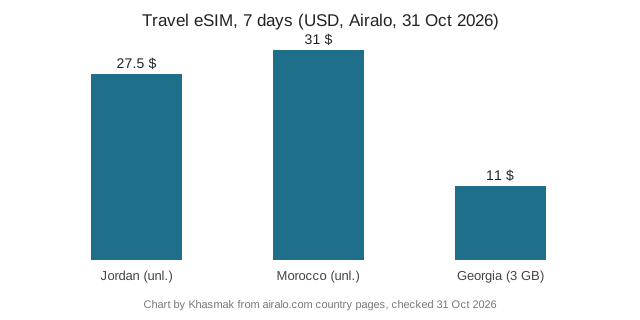
From Airalo's pages on 31 October 2026: a 7-day unlimited plan was $27.50 in Jordan and $31 in Morocco, while Georgia sells fixed-data plans only, including 3 GB for 7 days at $11. If you only need maps and WhatsApp, a fixed plan is usually enough and saves more than half.
eSIM steps on Pixel phones, per Google
| Task | Path on Pixel | Note |
|---|---|---|
| Add an eSIM | Settings > Network & internet > SIMs > Add SIM > Set up an eSIM | Android 11+ for some steps |
| Two eSIMs at once | Settings > Network & internet > SIMs > Add SIM | Pixel 7 or later, carrier must allow |
| Default data SIM | Choose Mobile data under primary SIMs | Only one SIM for data |
| Data during calls | Turn on Data during calls | On Pixel 8 and earlier, calls to the other SIM go to voicemail during a call |
Travel eSIM price examples
| Destination | Data | 3 days | 7 days | 15 days |
|---|---|---|---|---|
| Jordan | Unlimited | $12.50 (≈ 46.88 SAR) | $27.50 (≈ 103.12 SAR) | $58.00 (≈ 217.50 SAR) |
| Morocco | Unlimited | $14.50 (≈ 54.38 SAR) | $31.00 (≈ 116.25 SAR) | $49.00 (≈ 183.75 SAR) |
| Georgia | 1 / 3 / 5 GB | $4.50 (≈ 16.88 SAR) | $11.00 (≈ 41.25 SAR) | $16.00 (≈ 60.00 SAR) |
Sources: Google Pixel Help: dual SIM and eSIM and Airalo pages for Jordan, Morocco and Georgia, all checked 31 October 2026. SAR conversion is ours at the 3.75 peg.
Updated: 31 October 2026
Traveller questions
Do all Samsung phones support eSIM?
No; it depends on model and region; see supported phones.
Where is eSIM on Samsung?
Usually Connections, then SIM manager.
Can I run two lines?
On supported models.